
If your business runs on Microsoft Dynamics GP (Great Plains), you have probably heard that support is coming to an end. You may not know the exact dates, or what “end of support” means for your daily work. Let us go through it one step at a time.
Here are the two dates to remember:
- 31 December 2029: Microsoft stops product updates, tax and regulatory updates, and technical support.
- 30 April 2031: Microsoft stops security updates. This is the official end of life for Dynamics GP.
Your GP system will not switch off on either of these dates. What changes is how much help you get from Microsoft to keep it safe, compliant and up to date. If you want a shorter summary first, read our guide on Dynamics GP end of support and what it means.
Dynamics GP support timeline
Microsoft did not make this decision suddenly. The move away from Dynamics GP has happened in stages over several years:
- October 2022: Microsoft said GP 18.5 would be the last release with major new features. After that, GP would only get maintenance, tax and security updates.
- September 2024: Microsoft first announced 30 September 2029 as the end of support date.
- Early 2025: Microsoft extended product and regulatory support to 31 December 2029, with security updates to 30 April 2031.
- April 2026: Sales of new GP subscription and perpetual licenses ended. Existing customers can still use the software, but new customers cannot buy it.
- 31 December 2029: Product enhancements, service packs, payroll and tax updates, and technical support end.
- 30 April 2031: The last security updates are released. GP reaches full end of life.
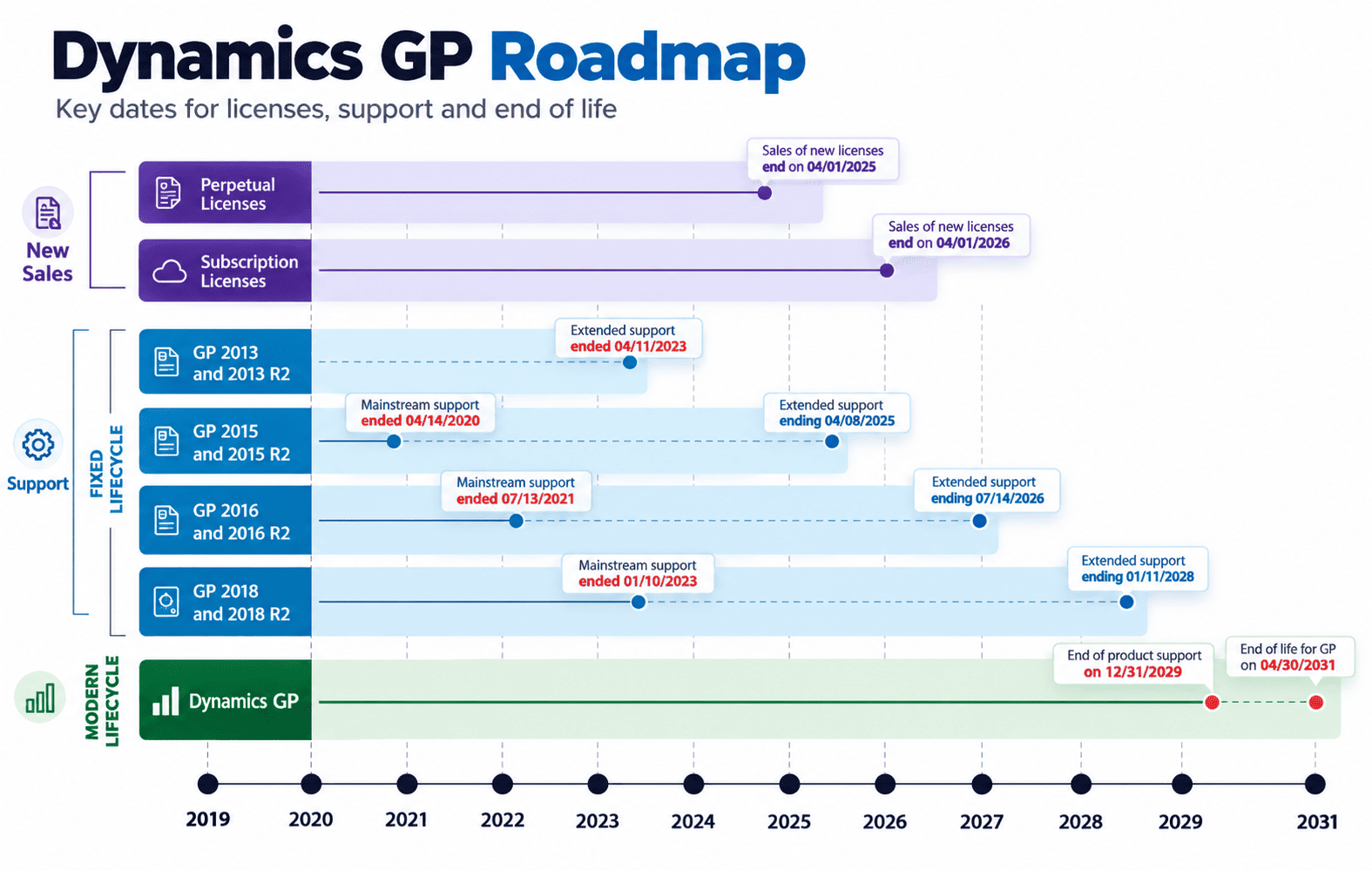
One important detail: these dates only apply if you are on a current version of GP. Newer versions follow Microsoft’s Modern Lifecycle Policy, which requires you to keep your system up to date to receive updates. Older versions (before GP 18.2) follow the Fixed Lifecycle Policy, and many of them are already out of support. If you are not sure which version you are on, check this before anything else.
What happens after 2029?
After 31 December 2029, GP enters a “security only” phase. In practice, this means:
- No payroll or tax updates. The 2029 tax year is the last one Microsoft will cover. If tax rules change in 2030, GP will not be updated for them.
- No new features or fixes. If you find a bug in 2030, Microsoft will not fix it.
- No technical support. You cannot raise a support case with Microsoft for general GP problems.
- Security patches only when Microsoft decides they are needed. These are for serious vulnerabilities, and there is no fixed schedule.
After 30 April 2031, even these security patches stop. From that day, your business alone is responsible for keeping GP secure and working.
What “support” really means
Many people think “support” only means someone to call when something breaks. In ERP software, it means much more. It includes:
- Regulatory updates so your accounts follow current tax and payroll rules
- Security patches to protect your financial data from new threats
- Compatibility updates so GP keeps working with new versions of Windows, SQL Server and Microsoft 365
- Bug fixes when something in the product does not work as expected
Even today, GP receives updates, but they are small and focused on keeping the system stable. Microsoft is not adding new capabilities to it. Compare this with cloud ERP systems like Business Central, which get two major updates every year along with monthly improvements.
So GP has already moved from a “growing” product to a “maintained” product. After 2029, it moves again, from “maintained” to “static”. A static system gets older every year while the world around it keeps changing.
What happens if you stay on Dynamics GP?
Some businesses plan to stay on GP for as long as possible. That is understandable, since GP has been reliable for many years. But the problems usually build up slowly, and many companies only notice them when they become expensive. Common issues include:
- More manual work. When new tools cannot connect to GP, your team fills the gaps with spreadsheets and re-entering data.
- Integration problems. New banking platforms, e-commerce systems and payment tools are built for cloud ERP, not for older on-premise systems.
- Rising IT costs. You still need servers, SQL licenses, backups and people who know GP, and that talent is becoming harder to find.
- Compliance risk. Without tax and payroll updates, your team must track and apply every rule change manually.
- Security exposure. Unpatched systems are an easy target, and your financial data is some of the most sensitive data you hold.
- Slower decisions. Reports that take days to prepare make it harder to react to what is happening in your business.
None of these will stop your business overnight. But together, they cost you time, money and flexibility every month you delay.
Can companies continue to receive Dynamics GP support from partners after end of life?
Yes, but it is important to be clear about what partner support can and cannot do.
What a partner can do after end of life:
- Help your users with day-to-day questions and problems
- Maintain your existing customizations and reports
- Troubleshoot issues within your current setup
- Keep your servers and database running
What a partner cannot do:
- Release official Microsoft security patches
- Provide official payroll and tax updates from Microsoft
- Fix problems in the core GP product code
- Add the modern features that cloud ERP platforms now offer as standard
Think of it like driving an older car after the manufacturer stops making parts. A good mechanic can keep it running for a while, but each repair costs more and takes longer, and the car will never get the safety features found in newer models.
Meanwhile, modern ERP systems keep moving forward with cloud access from any device, built-in automation, AI-assisted insights through Copilot, and direct connections to tools your team already uses. The longer you stay on GP, the bigger that gap becomes.
What does this mean for the future of Dynamics GP?
Microsoft’s direction is clear. The company is putting its investment into cloud ERP, and GP is not part of that future. The software will keep running after 2031, but with no updates, no official support and increasing risk.
For most GP customers, Microsoft’s recommended path is Microsoft Dynamics 365 Business Central. It is designed for small and mid-sized businesses, it covers everything GP does (finance, purchasing, sales, inventory, and more), and it gets regular updates from Microsoft. Larger or more complex organizations may consider Dynamics 365 Finance and Supply Chain Management instead.
Business Central also gives you a choice in how you deploy it. Most businesses choose the cloud, but if you need more control over your servers, Business Central on-premise is also available.
To see how the move works in practice, visit our page on Dynamics GP to Business Central migration.
When should you start planning?
The short answer is now, even though 2029 may seem far away.
A typical ERP migration for a mid-sized business takes around six to twelve months. More complex setups can take longer. That time goes into:
- Reviewing your current system: which customizations, add-ons and reports you actually use
- Choosing your new platform and planning the setup
- Cleaning and moving your data: deciding how much history to bring across
- Rebuilding integrations with banking, payroll, CRM and other systems
- Testing and training so your team is confident on day one
There is also a practical point. Thousands of GP customers face the same deadline. As 2029 gets closer, experienced migration partners will have less availability, and costs may rise. Starting early lets you choose a go-live date that suits your business, for example after your financial year-end, rather than rushing to meet a deadline.
Not sure how to plan your next step?
Knowing the dates is only the beginning. The real value is in building a plan that fits your business. Our team can review your current GP system and give you a clear, step-by-step roadmap. Talk to our Business Central consultants.
How Nevas Technologies helps Dynamics GP users
Nevas Technologies has more than twenty years of experience with Microsoft Dynamics. We help GP customers at every stage, whether you want to keep GP running smoothly for now or are ready to move.
Here is how we can help you:
- Assess your GP environment: version, customizations, third-party add-ons and data quality
- Identify risks and gaps before they become problems
- Recommend the right path, whether that is Business Central cloud, on-premise, or a phased move
- Run a structured migration covering discovery, database analysis, data migration, testing and user training
- Support you after go-live so your team settles in quickly
You can also review our Business Central implementation plans to get an idea of scope and cost before you speak with us.
Next steps
The dates are fixed. What you can control is how, and how early, you respond.
Businesses that plan ahead get to choose their timing, their partner and their budget. Businesses that wait often end up making rushed decisions under pressure, with fewer options and higher costs.
If you are still running Dynamics GP, a good first step is a simple review of your current system. Contact Nevas Technologies to discuss your GP plans and build a migration roadmap that supports your long-term growth.
FAQs about Dynamics GP support
When does Microsoft stop supporting Dynamics GP?
Microsoft ends product updates, tax and regulatory updates, and technical support on 31 December 2029. Security updates continue, only where needed, until 30 April 2031.
Will Dynamics GP stop working after 2029?
No. GP will keep running after 2029. However, it will not receive tax changes, bug fixes or technical support from Microsoft, so the risk of running it increases every year.
What happens after Dynamics GP reaches end of life?
After 30 April 2031, Microsoft releases no more updates of any kind, including security patches. Your business becomes fully responsible for keeping the system secure, compliant and working.
Why is Microsoft ending support for Dynamics GP?
Microsoft is focusing on cloud ERP platforms such as Dynamics 365 Business Central. These systems receive regular updates, scale more easily and connect better with modern tools like Microsoft 365, Power BI and Copilot.
What should I do if I’m still using Dynamics GP?
First, check that you are on a current GP version so you keep receiving updates until 2029. Then start reviewing your options. A Dynamics GP to Business Central migration is the most common path, and planning early gives you the most control over cost and timing.