


When something goes wrong with Microsoft Dynamics GP, one of the first questions any support engineer asks is: which versions of Windows, SQL Server and Office are you running? Many GP problems, from failed upgrades to email errors and slow performance, come down to a component that is not on Microsoft’s supported list.
In this guide, we bring together the current Dynamics GP system requirements in one place, explain what they mean in practice, and highlight the compatibility issues we see most often in our clients’ environments. The information is based on Microsoft’s published requirements for GP 2018 and the later 18.x releases.
Why System Requirements Matter for Dynamics GP
It is tempting to treat system requirements as a box to tick during installation and then forget about them. With GP, that is a risk.
- Microsoft only supports tested combinations: If you run GP on a version of SQL Server or Windows that is not listed, Microsoft Support may ask you to move to a supported version before helping.
- Some checks are enforced: GP checks the SQL Server version during installation and upgrade, so an unsupported version can stop an upgrade completely.
- Security depends on it: Older operating systems and database versions stop receiving security updates, which puts your financial data at risk.
- Upgrades depend on it: Each new GP release adds support for newer platforms and drops older ones. Planning an upgrade without checking requirements is one of the most common reasons projects are delayed.
It is worth recognizing that GP itself is now in its final years. Product updates and technical support end on December 31, 2029, and security updates end on April 30, 2031. Keeping your platform supported until you move is an important part of managing that risk.
Supported SQL Server Versions
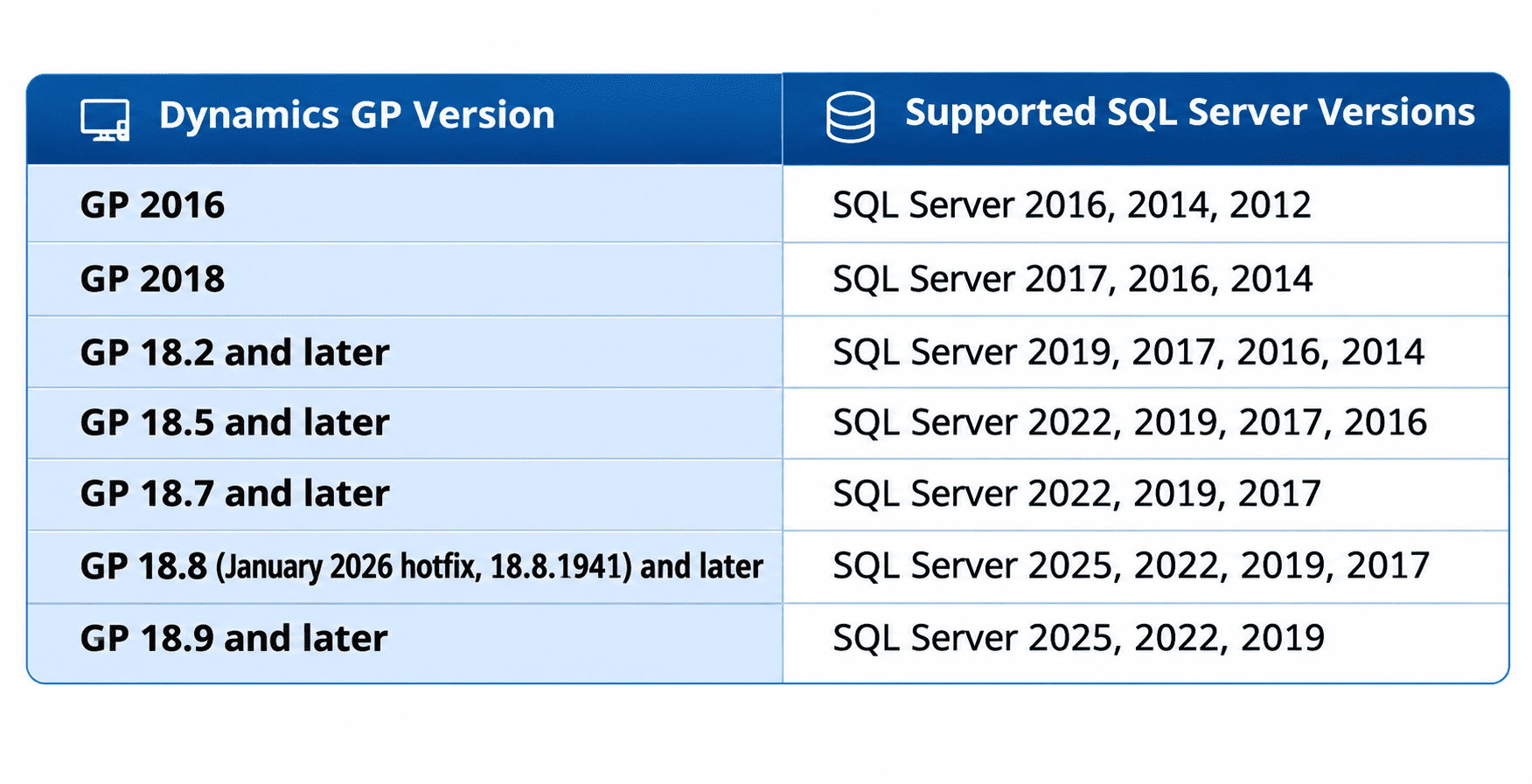
SQL Server is where all your GP data lives, so this is the most important compatibility point. Here is Microsoft’s current summary by GP version:
A few practical points:
- Editions: GP supports SQL Server Enterprise, Standard and Express. Express is only suitable for very small installations because of its database size and memory limits.
- Collation: GP requires either SQL_Latin1_General_CP1_CI_AS (dictionary order, case-insensitive) or Latin1_General_BIN (binary). You can check this in SQL Server Management Studio under the server properties. Collation is set when SQL Server is installed and is difficult to change later, so get it right from the start.
- Notice the drop-offs: From GP 18.7, SQL Server 2016 is no longer listed. From GP 18.9, SQL Server 2017 drops off as well. If you are on an older SQL version, upgrading GP may also mean upgrading SQL Server.
Supported Windows Server Versions
For the server hosting SQL Server, and for any Remote Desktop servers running the GP client, Microsoft lists these versions for current GP releases:
- Windows Server 2025 (GP 18.7.1756 or later)
- Windows Server 2022 (GP 18.5.1556 or later)
- Windows Server 2019 (GP 18.2.1013 or later)
- Windows Server 2016
- Windows Server 2012 and 2012 R2 (listed for older configurations, but long past Microsoft’s own support dates)
We want to emphasize one point here. Microsoft’s own extended support for Windows Server 2016 ends in January 2027, and Microsoft notes that the security changes introduced in GP 18.8, including the move to TLS 1.3, can cause Web Client issues on Windows Server 2016. If any of your GP servers still run 2016, now is the time to plan a move to Windows Server 2022 or 2025.
Also note that Visual Basic for Applications (VBA) is not supported on Windows Server 2019. If you rely on older VBA-based modifications, check them carefully before moving servers.
Supported Windows Client Versions
For users’ workstations, current GP releases support:
- Windows 11 Professional and Enterprise (GP 18.4.1434 or later)
- Windows 10 Professional and Enterprise
Older versions such as Windows 7 and 8.1 still appear in Microsoft’s table for older GP releases, but they no longer receive security updates from Microsoft, so we strongly recommend against using them.
Supported Microsoft Office Versions
GP connects with Office for exporting SmartLists to Excel, sending documents by email, using Word templates and building Excel reports. Microsoft lists these versions:
- Microsoft 365 (Office 365)
- Office 2024
- Office 2019
- Office 2016
Both 32-bit and 64-bit Office are supported, but there is an important detail many organizations miss:
- If you use 64-bit Office, the email server type in GP’s System Preferences must be set to Exchange.
- With 32-bit Office, you can use either MAPI or Exchange.
- From GP 18.3 onwards, GP supports Exchange 2013 or later only.
- To send documents as DOCX, PDF or XPS attachments, the Word template for each document must be enabled in the Template Configuration Manager.
Many “email not working” issues in GP come down to one of these settings. From the October 2020 release, GP also supports modern authentication and MFA for email through Microsoft 365.
Other Components You Should Not Forget
- ODBC: GP requires a 32-bit ODBC data source, even on 64-bit machines. Microsoft lists SQL Server Native Client 11.0 and 10.0 as supported drivers. If TLS 1.2 is enforced in your environment, make sure the driver version supports it.
- Remote access: Microsoft only supports two ways of using GP remotely: running the GP client on Remote Desktop Services (with or without Citrix) on the same network as SQL Server, or using the GP Web Client. Running the desktop client over a VPN or wide area network directly against SQL Server is not supported, because of the risk of connection and data errors.
- Virtualization: GP is supported on Hyper-V and other validated virtualization platforms, and on Microsoft Azure virtual machines.
- Domain: The core GP application can run in a simple workgroup, but web components, eConnect, Management Reporter and Workflow require a Windows domain.
Hardware Guidance
Microsoft does not publish strict server minimums. Instead, it offers recommendations based on how you use GP. Summarizing the main points:
- Client workstations: At least a dual-core 2.6 GHz processor, 2 GB of RAM and 2 GB of free disk space.
- Small environments: Financials only, up to around 20 concurrent users: a dedicated SQL Server with a dual-core processor and at least 2 GB of RAM.
- Medium environments: 20 to 60 users, distribution modules, Remote Desktop, integrations: at least 4 GB of RAM, with separate disks for logs, data and TempDB.
- Larger environments: 60 to 100 users, heavy transaction volumes: at least 8 GB of RAM and multiple processors.
- Remote Desktop servers: Around 4 GB of RAM for up to 15 users, 8 GB for up to 30 users and 16 GB for up to 60 users.
In practice, these figures are minimums from an earlier era. Modern environments usually perform far better with much more memory, solid-state storage and a dedicated SQL Server separate from the Remote Desktop server.
Common Compatibility Pitfalls
When analyzing GP environments for our clients, these are the issues we see most often:
- Upgrading SQL Server before GP: Moving to a newer SQL version than your GP release supports can stop GP working or block your next upgrade.
- Forgetting third-party add-ons: Each add-on has its own compatibility list. Check every one before changing GP, SQL Server or Windows.
- 64-bit Office with MAPI email: This combination is not supported and causes email failures.
- Running GP over a VPN: This is not supported and often leads to slow performance and data problems.
- Staying on Windows Server 2016: With support ending in January 2027 and known Web Client issues on newer GP releases, this is becoming a real risk.
Frequently Asked Questions
Which SQL Server versions does the latest Dynamics GP support?
GP 18.8 from the January 2026 hotfix supports SQL Server 2025, 2022, 2019 and 2017. GP 18.9 and later supports SQL Server 2025, 2022 and 2019.
Does Dynamics GP work with Microsoft 365?
Yes. Microsoft 365 (Office 365) is supported, along with Office 2016, 2019 and 2024. If you use 64-bit Office, set the GP email server type to Exchange.
Can I run Dynamics GP on Windows 11?
Yes, from GP version 18.4.1434 or later, on Professional and Enterprise editions.
Is it worth upgrading my GP infrastructure if we plan to move to Business Central?
If your move is more than a year away, keeping GP on supported versions protects your data and keeps Microsoft support available. If your move is close, a careful review can help you avoid spending on infrastructure you will not need for long.
How Nevas Technologies Can Help
At Nevas Technologies, we have more than two decades of experience with Microsoft Dynamics. Our team can review your GP environment, confirm which components are supported, and plan a safe Dynamics GP upgrade that brings Windows, SQL Server and Office into line.
Our Dynamics GP support team helps with troubleshooting and day-to-day issues, and when you are ready to leave server management behind altogether, our Dynamics GP to Business Central migration service can move you to Business Central in the cloud, where Microsoft looks after the infrastructure for you.
Need a GP environment review? Contact our team, or request a quote for an upgrade or migration.