


For professional services firms, contractors, engineering companies and nonprofits that manage grants, Microsoft Dynamics GP Project Accounting has often been at the heart of the business. It tracks what every project costs, what can be billed, and how much profit each piece of work actually makes.
It is a capable module, and many organizations have relied on it for well over a decade. But as teams grow, projects become more complex and expectations around real-time visibility rise, many start to feel its limits. With Dynamics GP support ending on December 31, 2029, now is a good time to understand exactly what Project Accounting does well, where teams outgrow it, and what comes next.
What GP Project Accounting Handles
Dynamics GP Project Accounting is built around a simple structure: customers have contracts, contracts have projects, and projects have cost categories. That structure drives everything else.
Contracts, projects and cost categories
Contracts group related projects for a customer and hold overall budgets and billing settings.
Projects hold the detail of the work, including dates, budgets, project managers and accounting settings.
Cost categories define the type of activity, such as labor, materials, equipment or expenses. Each category determines how cost, billing amount, revenue and profit are calculated.
Project types
Dynamics GP supports three main project types:
- Time and Materials: the customer is billed for the actual time, materials and expenses used, usually with a markup or billing rate.
- Cost Plus: the customer pays allowable costs plus a fee.
- Fixed Price: the customer pays an agreed price for the whole piece of work.
Budgets and cost tracking
Each project can have a detailed budget by cost category, covering quantities, costs, billing amounts and profit. As work happens, costs flow into the project from several sources:
- Timesheets for employee hours.
- Employee expense entries.
- Equipment logs and miscellaneous logs for other costs.
- Purchase orders and vendor invoices linked to projects through Purchase Order Processing and Payables.
- Inventory transfers to projects.
Rate tables and profit types help control how costs and billing amounts are calculated, and fees such as retention or service fees can be added to contracts and projects.
Billing
Project Accounting includes its own billing process. You can use billing cycles to bill groups of customers, contracts or projects at once, choose invoice formats designed for each project type, bill fees, and suspend billing where needed. Billing types also let you mark costs as standard, no-charge or not billable.
Revenue recognition
This is one of the module’s real strengths. Dynamics GP supports several accounting methods:
- When Performed and When Billed, for Time and Materials projects.
- Cost-to-Cost and Effort Expended (Labor Only), both percentage-of-completion methods for Fixed Price and Cost Plus projects.
- Completed Contract, where revenue is recognized when the project is finished.
Revenue recognition cycles let you process many projects at once, and Work in Process (WIP) accounts track unbilled costs until they are billed or recognized.
Inquiry and reporting
Project inquiry windows and reports show budget against actual figures, billed to date, revenue earned and gross profit for each contract and project.
Where GP Project Accounting Works Well
We want to emphasize that, for many organizations, GP Project Accounting still does its job well. It is a strong fit when:
- Projects are financially driven, with accounting and billing at the center.
- Billing models are well defined, such as time and materials or fixed price.
- Revenue recognition needs to follow clear, consistent rules.
- Project costs need to flow cleanly into Payables, Purchasing and the General Ledger.
Signs Your Team Has Outgrown It
In our experience, organizations start to recognize they have outgrown GP Project Accounting when several of these become everyday frustrations:
- Project managers work outside the system. Plans, schedules and resource bookings live in spreadsheets or separate project tools, and finance only sees the numbers at month-end.
- Resource planning is a struggle. GP tracks time and cost well, but it was not designed for scheduling people across many projects, checking availability or forecasting utilization.
- Time and expense entry is awkward. Staff working on site, remotely or on mobile devices find it hard to submit timesheets and expenses quickly, which delays billing.
- Real-time visibility is missing. Leaders want live dashboards showing margin, utilization and backlog, but getting them means exporting data and building reports.
- The sales-to-delivery journey is broken. Quotes and opportunities sit in a CRM, while projects are set up again by hand in Dynamics GP.
- Heavy reliance on customizations or add-ons. Over time, many organizations have built custom reports and processes to fill gaps, which makes upgrades and support harder.
- Multi-entity projects are difficult. Sharing resources or costs across legal entities often needs manual workarounds.
- The platform has no future. Microsoft is not adding new features to GP, and support ends in 2029, with security updates ending on April 30, 2031.
Replacement Options
Option 1: Projects in Dynamics 365 Business Central
For most GP Project Accounting users, Dynamics 365 Business Central is the natural next step. Its Projects feature (previously called Jobs) is included with the Essentials license and covers most of what GP Project Accounting does:
- Project tasks to structure the work, with indented tasks for grouping.
- Planning lines that can be set as budget, billable or both, so the same lines drive the budget and the invoice.
- Resources for people, equipment and subcontractors, with cost and price rates.
- Time sheets linked to project tasks and planning lines, with approval.
- Project invoicing for both time and materials and fixed price work.
- Work in Process (WIP) methods, including cost value, sales value, cost of sales, percentage of completion and completed contract.
- Budget against actual tracking that updates as usage is posted.
Because projects sit in the same system as finance, purchasing and inventory, everything posts to the General Ledger with a full audit trail. Business Central also offers modern reporting through analysis mode and Power BI, and access from any device. You can see more on our Business Central features page.
Option 2: Business Central plus project extensions
Where you need more, such as advanced resource scheduling, Gantt charts, mobile time entry or industry-specific project billing, there are many Business Central extensions designed for project-based businesses. This keeps the core system simple while adding depth where it matters.
Option 3: Dynamics 365 Project Operations
For larger, delivery-led professional services organizations, where resourcing, utilization and margin analysis are daily priorities, Dynamics 365 Project Operations may be the better fit. It brings together sales, resource scheduling, time and expense, and project accounting in one solution. It is more powerful, but it also involves higher license costs and a bigger implementation. You can learn more on our Microsoft Dynamics 365 page.
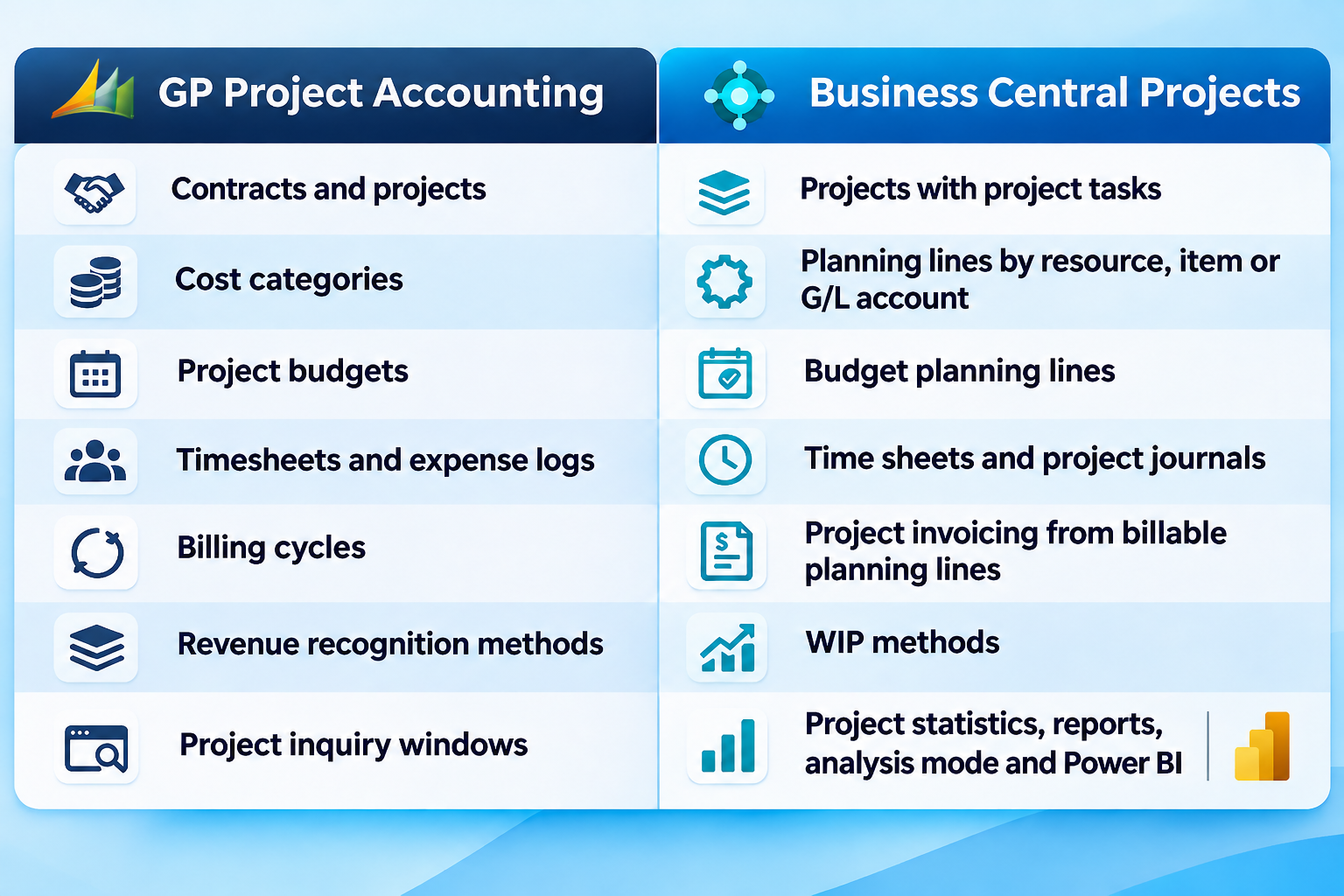
GP Project Accounting vs Business Central Projects
Planning the Move
Project data needs careful handling during migration. Microsoft’s Dynamics GP-to-Business Central cloud migration tool focuses on financials, customers, vendors, items, inventory, open purchase orders and bank data, so Project Accounting data such as contracts, budgets and work in process is not part of its standard scope.
A sensible approach is to:
- Decide how to handle open projects. Many organizations finish short projects in GP and move only active, long-running projects.
- Bring across opening balances for budgets, costs to date, billed to date and WIP, rather than every historical transaction.
- Redesign your structure. Map contracts, projects and cost categories to Business Central projects, tasks and planning lines, rather than copying GP as it is.
- Agree on WIP and revenue recognition methods with your finance team and auditors before go-live.
- Train project managers as well as accountants, so the new system is used across the whole organization.
Frequently Asked Questions
Does Business Central have project accounting?
Yes. Business Central’s Projects feature supports project tasks, budgets, resources, time sheets, invoicing and WIP calculation, and it is included with the Essentials license.
Can Business Central handle percentage-of-completion revenue recognition?
Yes. Business Central offers several WIP methods, including percentage of completion and completed contract.
Will Microsoft’s migration tool move my GP projects?
Not as standard. The tool focuses on financial and core master data, so project data needs a separate migration plan.
When should we choose Project Operations instead of Business Central?
When you are a larger services organization where resource scheduling, utilization and sales-to-delivery integration are central to the business, and Business Central’s projects feature would need heavy extension.
How Nevas Technologies Can Help
At Nevas Technologies, we have more than two decades of experience with Microsoft Dynamics. We help project-based organizations review their GP Project Accounting setup, choose the right replacement and plan a smooth Dynamics GP to Business Central migration.
Our Business Central consultants design project structures that fit how you deliver and bill, while our Dynamics GP support team keeps GP running smoothly until you are ready to move. You can also review our Business Central pricing and licensing options.
Ready to rethink project accounting? Schedule a demo, or contact our team for a free consultation.